
What is Arena of Champions?
Arena of Champions is an independent, WoW-inspired PvP game that you can enter from a browser. Its official address is arenaofchampions.live. It brings recognizable class identities into a smaller arena-focused setting rather than asking you to level through the World of Warcraft MMO first. You select a hero and specialization, read the available abilities and learn fights where range, control, terrain and timing matter.
The shared town is a staging area. You can inspect heroes, find practice and arena NPCs, see other players and prepare for a match. Reaching town does not put you into a rated fight automatically. That distinction makes guest entry useful: you can look around and test the interface before deciding which bracket to join or whether to save an account. Our homepage player embeds the official client; the game itself handles the session.
People searching for “Arena of Champions WoW” are often trying to identify a clip or find the playable version. This is a fan project, with its own implementation and update history. Your retail WoW characters, gear and subscription are not transferred into it. You also do not need to install Blizzard’s client to use the browser version. If you wanted a comparison with the other duel-focused game, continue to Arena of Champions vs WebWoW.
Nine classes, with different jobs inside each.
The v0.21 reference contains nine classes and nineteen specializations. Specializations define a more useful team role than the class label alone. A Paladin may be healing or dealing melee damage; a Druid has healing, melee and ranged options. Check the selected specialization before telling a teammate you can cover a role. Familiar Warcraft names provide a starting point, but the current client defines the actual spells, numbers and restrictions.
| Class | Specializations | Role choices |
|---|---|---|
| Warrior | Arms, Fury | Melee damage |
| Mage | Fire, Frost | Ranged damage |
| Priest | Discipline, Shadow | Healing or ranged damage |
| Rogue | Assassination, Subtlety | Melee damage |
| Hunter | Marksmanship, Beast Mastery | Ranged damage |
| Paladin | Holy, Retribution | Healing or melee damage |
| Warlock | Affliction, Demonology | Ranged damage |
| Druid | Restoration, Feral, Balance | Healing, melee or ranged damage |
| Shaman | Restoration, Enhancement | Healing or melee damage |
For a first session, compare how a class spends its time. Do you like staying in contact with an opponent, preserving distance, or watching a partner’s health? Read the resource description and learn what prevents your main action from being used. A spell can be unavailable because of range, resources, a cooldown or a control effect. Those are different problems, and changing classes immediately can conceal the lesson.
The interactive class directory includes role filters and practice notes for this roster. Those notes are learning suggestions, not measured competitive rankings. The talent planner helps you choose a goal such as survival or pressure. Select effects that support that goal, test one change at a time and revisit the choices after a balance update. A build copied from an older clip may refer to abilities that have since changed.
Choose between practice, duels and team brackets.
Practice is the most controlled introduction. In the checked town, Bromli Thunderkeg is the Practice Master by the eastern tent. Right-click him, choose the available bracket and opponent options and start a practice match. This gives you a place to test a main action, defensive and interrupt without treating a player ladder as a training dummy. Read the dialog in the current version because NPC positions and options can change.
The 1v1, 2v2 and 3v3 brackets ask different questions. A one-on-one fight highlights your own range, resources and responses. In 2v2, a partner’s position becomes part of nearly every decision. In 3v3, more control and defensive options overlap, so a short shared plan becomes even more valuable. A class choice that feels comfortable in a duel may need a different talent goal when a teammate depends on it.
Town duels and spectating are also part of the dated update history. Watching an available match through the Arena Herald can help you learn what an unfamiliar toolkit looks like before facing it. Treat observation as a way to notice positioning and timing, not a way to declare the strongest class after one outcome. An experienced player can make an awkward matchup look simple; a single clip rarely shows all the attempts that preceded it.
Before pressing a queue option, confirm the bracket and whether it is practice, rated or unrated. If an option is unavailable, read the actual explanation. Do not assume that entering town means you are queued, or that a long wait means the server has crashed. The beginner manual explains a first-match routine and how to separate a loading error from a matchmaking wait.
How to interpret ratings and matchmaking.
Arena of Champions has a rated arena history, but a rating should always be read with its bracket and version. The v0.21 summary records a reset to 1500 across brackets and changes to healer matchmaking. That is a dated reset event, not a promise that every player you meet today has the same starting conditions. The current scoreboard and ladder explain the state of the game more directly than a screenshot from an earlier release.
Do not compare numbers across 1v1, 2v2 and 3v3 as if they measured one identical activity. Different populations, partners and match formats change what a result tells you. Even within a bracket, a few early matches provide little evidence about a class. Record the role you played and the mistake you want to fix rather than treating each rating movement as a full assessment of your ability.
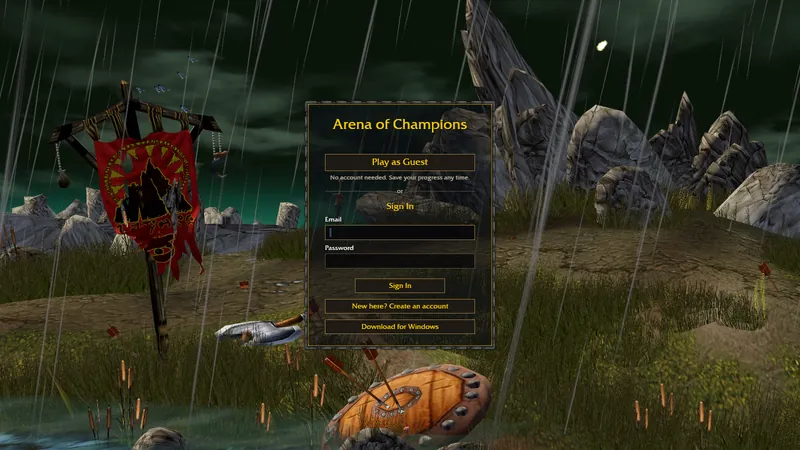
The login screen currently offers guest entry and says you can save progress at any time. Older independent guides disagree about which rated features require registration, so we do not present a blanket restriction as a current rule. Read the queue prompt in your session and save an account through the official game when you want a stable identity. Check the client before switching devices or assuming that an unsaved guest can be recovered.
Queue speed is variable. It depends on who is active, which bracket they selected and the matchmaking conditions at that moment. This site has no live matchmaking feed and does not promise a wait time. If you report a problem, include the bracket, time, region if shown and whether the world itself is responsive. A connection error before town loads is a different issue from a queue that has not found a compatible match.
Make the toolkit usable under pressure.
Arena of Champions uses an action bar with configurable bindings. In the checked update history, G is the second selected utility, F1 targets yourself and F2/F3 target teammates; v0.21 adds mouse-wheel bindings and other control improvements. These are versioned defaults. Your saved settings can differ, so inspect the client before changing a habit based on an online guide. Laptop function keys may also be intercepted by the operating system.
Start by placing frequent actions where you can reach them while moving. Then choose a dependable key for the defensive you are most likely to need quickly. Test friendly targeting when nobody is attacking: select yourself, select a partner and observe which frame is active. Healing the wrong target is a targeting problem even if the healing spell itself is correct. Add more bindings once those basics work reliably.
Terrain deserves the same practice as buttons. Pillars can prevent an attack or a helpful heal when the target is out of sight. Blade’s Edge adds a bridge, ramps and a lower area, so distance on the screen may not tell you whether you can reach an opponent. When you lose contact, think about elevation and sight lines before assuming the spell failed. Plan a retreat route that your partner can follow.
Use the 2v2 and 3v3 team builder to make role choices explicit. It checks the selected specializations and offers preparation prompts; it does not simulate damage, verify a legal queue or guarantee synergy. Agree on a target, opening control and first defensive response. After a match, review whether the plan was executed before replacing the entire lineup.
Find the official game and community information.
For Arena of Champions Discord information, begin with the current official game or a developer-posted link. We have verified the playable address, but have not verified a permanent AoC Discord invite suitable for publishing here. An expired or copied invite can lead to a different community, so this guide sends you to the source rather than presenting an unconfirmed server as official. Our community directory explains the verified links available for the other games.
Reddit can be useful for discovering how people found a project and what device problems they encounter. Distinguish a discussion from an announcement: a player saying a feature is coming is not the same evidence as a developer release note. When looking for help, search the game’s exact name and the error message, and check the date. A browser issue from an older release may already have been fixed or may apply to a different fan game.
Useful bug reports describe reproducible steps. Include the browser version, operating system, selected class and whether the issue happens in the browser client or the official Windows version. If a control does not work, say whether the game had focus and whether the action was on cooldown. Share only the information needed to diagnose it. This site is an independent guide and cannot moderate the game, restore an account or resolve a server-side queue.
Read updates as a dated timeline.
The checked release sequence moved quickly: v0.1 introduced Warrior, Mage and the Nagrand arena on 20 October 2026; subsequent releases added more classes, a shared town and team systems. The v0.9 summary records the move to arenaofchampions.live on 26 October, while v0.11 introduced guest entry on 27 October. Those milestones explain why older clips can show a different lobby or login flow from the current browser client.
More recent highlights include the friends and party features in v0.17, two selected utilities per specialization in v0.19 and Balance Druid in v0.20. The v0.21 summary combines the bracket-rating reset with healer matchmaking and control changes. Visit our update highlights for the selected summaries, or the release timeline for the wider sequence and source limits.
After an update, check the parts of your setup that it touched. A new utility may need a binding, a new specialization may change your team’s role options and a changed control effect may alter an opening plan. Current tooltips take priority over this dated snapshot for exact values. Try the browser version first, then consult the official-download guide if you want the optional Windows client or need to diagnose graphics support.
Frequently asked questions.
Is Arena of Champions an official WoW game?
No. It is an independent fan project inspired by WoW-style arena combat. It has its own client, account system and balance rules.
How many classes are in Arena of Champions?
The v0.21 snapshot checked on 30 October 2026 contains nine classes and nineteen specializations, including Balance Druid. Check the current Heroes panel for later additions.
Can I play Arena of Champions without downloading a client?
Yes. The official browser client offers guest entry. An optional Windows download is available through the official site, but is not required to try browser play.